
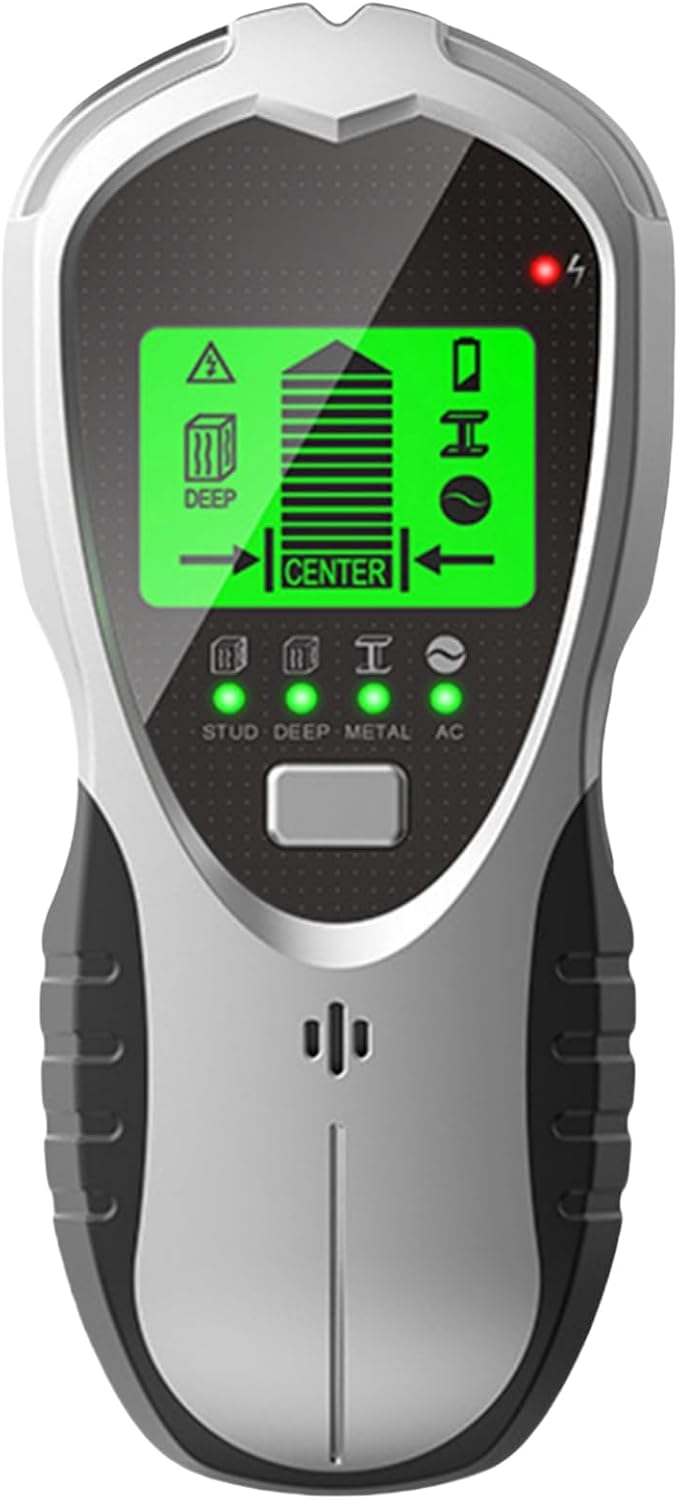
ThreeH Stud Finder 4 in 1 Multi-Function Wall Scanner Portable Wire Scanner Accurate Wall Tester with Deep Detection for Joist Pipe
Product details
| Management number | 221917269 | Release Date | 2026/05/04 | List Price | US$8.40 | Model Number | 221917269 | ||
|---|---|---|---|---|---|---|---|---|---|
| Category | |||||||||
Specification:Product size:172*76*37mm/6.7*2.9*1.45inMaterial:PC/ABSDisplay:LED liquid crystal green backlit displayWeight:210g/0.46lbBattery:Included in the productProduct features: Accurate positioning / intuitive display / long-lasting / easy to operate Operation:For best scanning results, it is important to hold the Stud Locator properly and move it slowly while scanning. Use your thumb on one side and your fingers on the other side to hold the handle. Make sure the fingertips are on the handle and do not touch the surface being scanned or the scanning head of the tool. Hold the tool straight up and down, parallel to the studs.Calibrating the tool: It can be calibrated anywhere on the wall. It will automatically recalibrate when needed and successfully find the center of a wall stud in one step. Place the unit flat on the wall. Press the Power button to turn on the power. Pressthe Scan button to begin calibration, the decrement bar will disappear and the buzzer will beep once, calibration is complete. Finding the studs:Always scan for studs with the scanner flat against the wall. When power is applied, press and hold the scan button. Before moving the scanner, wait for the speed lever to disappear and beep to confirm that calibration is complete. Slowly sliding the tool. When positioned in the center of the wall wedge, the full bar on the signal strength indicator, the pointed arrow at the top of the bar, and the center indication will be displayed and the buzzer will sound.
- ✬4-in-1 Versatility: The stud finder is equipped with 4 scanning modes including metal detection mode, wood detection mode, and AC scanning mode and depth of detection mode, which can be used to identify the centers and edges of wood, metal, and deep-buried objects, helping you to quickly locate the exact position of a stud.
- ✬Visualized Display: the wall tester is equipped with LED backlit display, which can display the test results in the form of graphic or digital visualization, so that the user can see the internal condition of the wall at a glance, and even if you are in a darker environment, you can also easily see the content of the display.
- ✬Locate Accurately and Quickly:The wall scanner is equipped with high-precision sensors, which can accurately detect the structure and material distribution inside the wall, identifying wood, metal, and electrical wiring to help you locate drilled holes quickly. It can reduce miscalculations during construction.
- ✬Save Time: Are you having trouble drilling touch screen wires, our stud finder can solve your worries in this area, it is easy to use, just press the center mode button to switch between different scanning modes in one click, saving your effort and time for accurate drilling.
- ✬Enhanced Efficiency: This metal finder of ours is a practical tool designed to enhance work efficiency. This finder is quickly becoming a popular choice among architects and diy enthusiasts for its accurate detection ability and user-friendly design. Whether you are working on automotive repairs, building construction or daily home maintenance, the stud finder can easily locate hidden studs and help you!
| Color | Silver |
|---|---|
| Brand Name | ThreeH |
| Item Weight | 7.36 ounces |
| Manufacturer | ThreeH |
| Model Number | SH201 |
| Power Source | Battery Powered |
| Material Type | Acrylonitrile Butadiene Styrene |
| Included Components | Batteries |
| Are Batteries Required | Yes |
| Manufacturer Part Number | H-PF07 |


Bestseller ranking
Stud Finders




Correction of product information
If you notice any omissions or errors in the product information on this page, please use the correction request form below.
Correction Request Form